Sunday, December 14, 2014

BeagleBone Black

Finally I got my BeagleBone Black.
And I got answer for my first question.
Q: How to boot from SD card.
A: BBB boots from SD card by default. So, prepare bootable SD card as widely described, insert card, supply power.

Thursday, May 15, 2014

Cashtrash - simple personal cash manager

Next mobile app.
Now with Qt5 tech.
There are desktop and android versions.
[Sourceforge link]
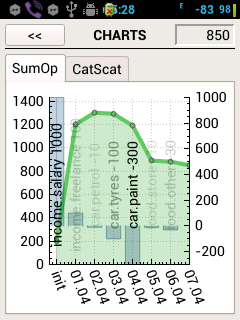
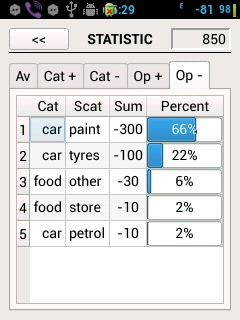
Statistic window

Chat window

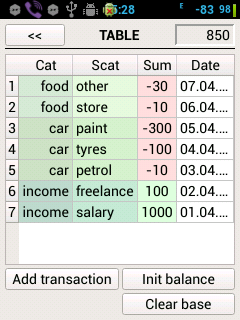
Table window


Thursday, April 18, 2013

MoSyncTools: PopupMenu tool

Hi!
This is last tool in MoSyncTools cycle.
PopupMenu in action.

PopupMenu with many items.

PopupMenu shows menu with title, help message and some buttons
This project was created to simplify common task - create and show menu.
There is possibility to change title, text of help, remove and add menu items, to hide and show menu.

Demo program, html/pdf help at github.

Monday, April 15, 2013

MoSyncTools: PopupProgress tool

Hi!
Here is second NativeUI tool -- PopupProgress. It shows message with title, text and progress bar with percentage.
PopupProgress in action.
You can find demo program, html and pdf help at github.

Friday, April 12, 2013

MoSyncTools: WaitMessage tool

Hi!
Here is first NativeUI tool among MoSyncTools. It shows message with caption, message and wait indicator.
WaitMessage in action.

github

Tuesday, April 9, 2013

MoSyncTools: StorageWorks tool

Here is second MoSync tool:
StorageWorks -- easy OOP wrapper of MoSync storage.
github repository

Wednesday, April 3, 2013

MosyncTools announce

Hi!
I decided to share some of useful tools which I created during work under reList455 project.
First of them is StringSdcard -- simple way to write/read string to/from device's SD card.
Feel free to explore github repository.

Thursday, February 7, 2013

Mobile development

Found myself dabbling in mobile development with MoSync SDK.


My first mobile application at google play: reList455.

Source code available at github.

Monday, July 23, 2012

Markdown cheatsheet

I create Stack Exchange markdown cheat sheet. It is very simple, consists of 4 pdf pages each of them contains 2 pages of info.
Example of page

It contains all major markdown syntax items and Stack Exchange additions.
Download here.

Saturday, July 21, 2012

mWatch455

Another mobile application released.
mWatch455 is simple chronograph for mobile phone.


sourceforge project page and video

Friday, June 15, 2012

win95m release

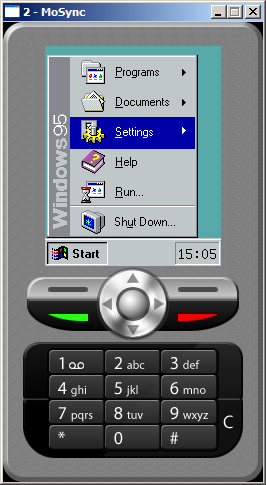
I released application for mobile phone. This app imitates windows95. Looks fun.
[sf project page]


Friday, June 1, 2012

Linux. Eclipse + wxWidgets. Screencast.

  Here is video showing how to install wxWidgets and Eclipse IDE to Linux system and make them work together. This screencast based on my previous post with little exceptions (java was already installed, also I installed libgtk2.0). Some pieces were cut(biggest of them - 'make' wxWidgets output). At the end of the video you can see customized 'minimal' wxWidgets application builded with Eclipse IDE.


  Here is link to video.

Wednesday, May 16, 2012

Linux. Eclipse + wxWidgets

In this post I describe how I installed wxWidgets and Eclipse at Linux system and make them work together.

Here is my plan:

1. Install wxWidgets

  1.1 download

    I use this link. It's last stable version for this moment.

  1.2 unpack

    I use this command: tar -xvf <wxWidgets archive.tar.gz>

  1.3 build

  • change directory to unpacked archive cd <wxWidgets folder>
  • make build folder mkdir <wxWidgets build folder>
  • change current directory to build folder cd <wxWidgets build folder>
  • I select following parameters for configure script:
    ../configure --enable-stl --enable-unicode --enable-static --disable-shared --enable-monolithic --enable-debug
  • then type make
  • then sudo make install
  • and sudo ldconfig

1.4 *checkpoint*: build 'minimal' sample application

    I run make command in <wxWidgets build folder>/minimal> directory and get minimal wxWidgets application.

2. Install Eclipse

  2.1 install Java if it's not installed

    I use this link.

  2.2 *checkpoint*: get Java's version

    java -version

  2.3 download Eclipse

    I need Eclipse IDE for C/C++ Developers. It can be found here.

  2.4 unpack

    tar -xvf <Eclipse archive.tar.gz>
    There is no install procedure. Just change directory to unpacked Eclipse folder and run ./eclipse

   2.5 *checkpoint*: build trivial C++ project


3. Connect Eclipse with wxWidgets.

  3.1 set project options

  • navigate Project > Properties > C/C++ Build > Settings > Tool Settings 
  • add to C++ Compiler > Command line pattern following string `wx-config --cxxflags`
  • add to C++ Compiler > Includes path to wxWidgets/include folder
  • add to C++ Linker > Command line pattern following string `wx-config --libs`

  3.2 *checkpoint*: build 'minimal' sample application from Eclipse


After all this steps I got Linux system with installed wxWidgets and Eclipse IDE.

Tuesday, May 8, 2012

about wxWidgets install

In this post I speak about common questions of installing wxWidgets.

Installing wxWidgets can be confusing for newcomers from Windows systems but it quite easy for them who knows how to install software from sources at Linux systems. Main difficult is that you should compile wxWidgets libraries by yourself. Common process of install is something like this:
  1. Download wxWidgets sources.
  2. Unpack sources.
  3. Build wxWidgets from sources.
  4. Configure IDE if you use it.
It's easy. But at Windows systems you have to make step 0 - install building tool - MinGW.

In next post I'll describe how I installed wxWidgets at Linux system.

Thursday, May 3, 2012

about wxWidgets

There are several ways to create GUI application based on C++. One of them is wxWidgets.
In short,  wxWidgets is a C++ library to create cross-platform GUI applications.

Here I put some main features of this library:
  • native look and feel for every platform
  • license allows to create GPL and proprietary applications
  • small size of library/application
  • additional auxiliary classes
  • it is quite popular among developers

You can read some info about this library at official project site or wikipedia page.
You can compare wxWidgets with other toolkits and with Qt.
You can even get to know why you shouldn't use wxWidgets.

There are a lot of tasks where wxWidgets is right tool.
I used this tool to create my first C++ GUI application - notes455:
notes455 running on Windows...

    ...and on Linux

    Wednesday, April 25, 2012

    wxWidgets cycle announce

    I plan to create some posts about my experience with wxWidgets.


    It will not be complete step-by-step guide or solid manual. But I hope that it would be helpful at least for me as a memory notes.

    Friday, April 20, 2012

    hello

    First test post. 
    Other info will be added later.